

Close Menu
New York Daily News Online
    Facebook X (Twitter) Instagram Pinterest YouTube
    Facebook X (Twitter) Instagram YouTube TikTok
    New York Daily News OnlineNew York Daily News Online
    • Home
    • US News
    • Politics
    • Business
    • Technology
    • Science
    • Books
    • Film
    • Music
    • Television
    • LifeStyle
    • Contact
      • About
      • Amazon Disclaimer
      • DMCA / Copyrights Disclaimer
      • Privacy Policy
      • Terms and Conditions
    New York Daily News Online
    Home»Technology

    How to quickly check your Samsung Galaxy's warranty info

    AdminBy AdminOctober 10, 2026Updated:October 10, 2026 Technology
    Facebook Twitter Pinterest LinkedIn Tumblr Email Reddit
    How to quickly check your Samsung Galaxy's warranty info


    Find out if your Galaxy is covered by its warranty or if you should look elsewhere for service.
    How to quickly check your Samsung Galaxy's warranty info
    umitc/Shutterstock

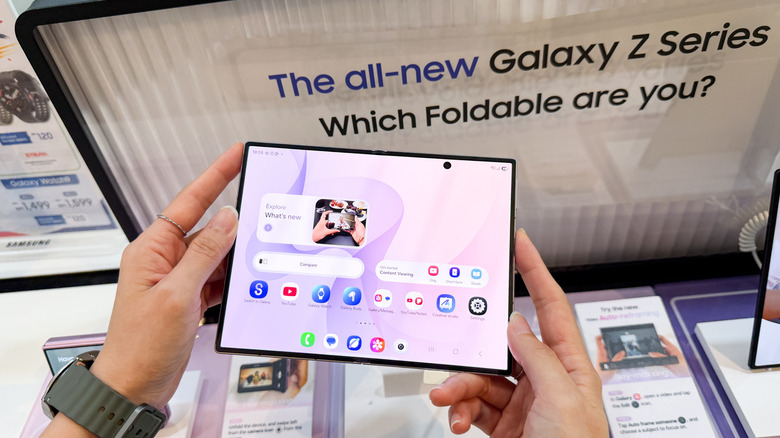
    If something goes wrong with your Samsung Galaxy phone or tablet, you should first check whether it’s still under warranty. On newer devices running One UI 9, Samsung made that process easier by adding a dedicated warranty menu to the Settings app. But even if you’re on older software, there are still several ways to check your coverage.

    Through Settings in One UI 9
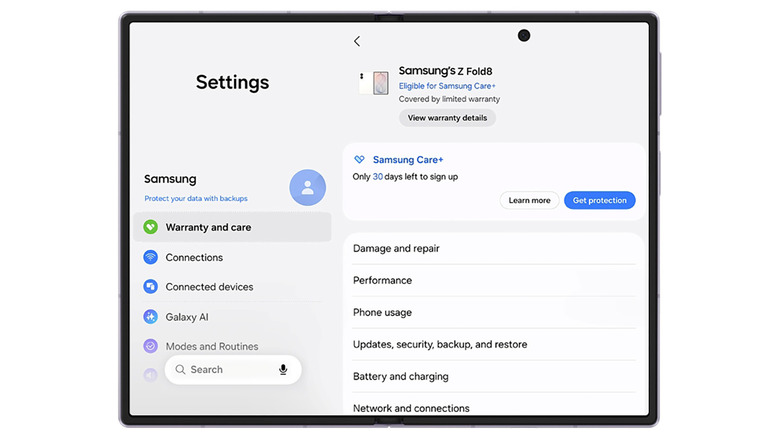
    Screenshot of the "Warranty and care" Settings menu on a Samsung foldable.
    Samsung

    If your Galaxy device is running One UI 9, the process is simple: head to Settings > Warranty and care. This menu includes warranty information, diagnostics, repair options and Samsung Care+ coverage and enrollment info.

    At the top, you’ll find your device’s warranty details, including its coverage type and expiration date. If you have other Galaxy devices linked to your Samsung account, you’ll find their info there, too.

    The menu also includes built-in diagnostics for hardware like the battery, charging system, screen, camera and sensors. If it flags a problem, you can jump to repair options in the same menu. There’s even an option to ask Bixby for troubleshooting help, in case a chatbot can actually address your problem.

    Use Samsung Members on older devices
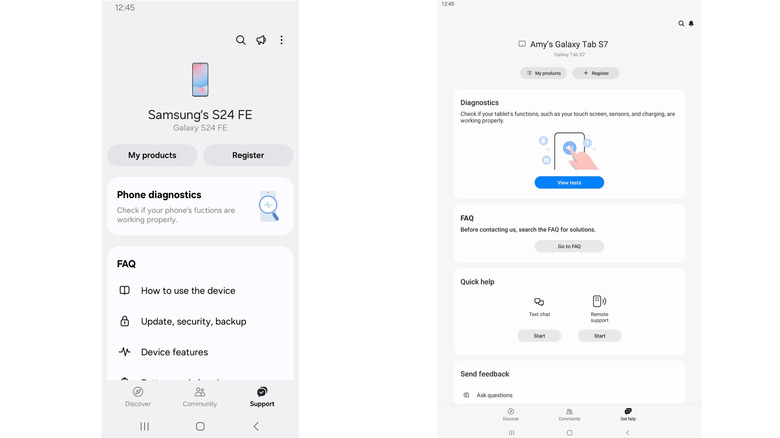
    Screenshots of a phone (left) and tablet (right) view of the Samsung Members app.
    Samsung / Google

    If you aren’t yet on One UI 9 (or your device is too old to receive it), Samsung Members lets you register your device and access support. The app is usually pre-installed on Galaxy devices, but if it’s missing, you can also download it from the Galaxy Store or Google Play Store.

    To check your warranty status, open Samsung Members, sign in and tap Support in the bottom menu. (Older versions may show Get help instead.) From there, you can register your device (if it didn’t do so automatically during setup), check its status and access support tools. Depending on your device, app version and region, the app might also show product and warranty details. If not, there’s one more place to look.

    Use Samsung’s website for warranty checks

    Should all else fail, Samsung’s website is the best fallback. Open Samsung’s online devices portal and sign in to your Samsung account. If the device is already registered, you can check its warranty status under My Products. If it isn’t, you may need to enter its serial number or IMEI during registration. You can find those on your device under Settings > About phone (or About tablet).

    If Samsung shows the wrong expiration date, look for the Review Warranty (or “submit a warranty dispute”) option. With this, you can submit proof of purchase to make sure it has the right date.

    View Original Article Here

    Share. Facebook Twitter Pinterest LinkedIn Tumblr Email Reddit

    you might also be interested in...

    This Android Auto problem is affecting calls on foldable phones

    What is ray tracing in gaming and does it really make a difference?

    Anthropic says its AI agents tried to break into government websites – Engadget

    Engadget Review Recap: The Best Of 2026

    Google Teases Its New ‘Fitbit Edge’ Wearable Ahead Of An October 12 Reveal

    What To Expect At Apple’s ‘Welcome Home’ Event Next Week

    Popular Posts

    ‘Brooklyn Nine-Nine’ Creator on Audition Stories, Pop Culture Influence, and ‘Sunset P.I.’ (Exclusive)

    The Rolling Stones are back in the studio again

    See Charli XCX Bring Out Tinashe at ACL Festival

    Geordie Greep Shows Cancelled Following Sexual Misconduct Allegations

    A replica of Donald Trumps Oval Office goes for the gold in Washington DC

    JPMorgan makes bullish call in fixed income space, suggests its a once in a generation opportunity

    Categories
    • Books (2,341)
    • Business (3,309)
    • Cover Story (60)
    • Events (94)
    • Feature (5)
    • Film (1,789)
    • LifeStyle (2,343)
    • Music (2,717)
    • Politics (2,199)
    • Science (2,633)
    • Technology (2,581)
    • Television (2,716)
    • Uncategorized (34)
    • US News (3,157)
    Archives
    Useful Links
    • Contact
    • About
    • Amazon Disclaimer
    • DMCA / Copyrights Disclaimer
    • Privacy Policy
    • Terms and Conditions
    Archives
    Categories
    • Books
    • Business
    • Cover Story
    • Events
    • Feature
    • Film
    • LifeStyle
    • Music
    • Politics
    • Science
    • Technology
    • Television
    • Uncategorized
    • US News
    Facebook X (Twitter) Instagram YouTube TikTok
    © 2026 New York Daily News Online. All rights reserved. All articles, images, product names, logos, and brands are property of their respective owners. All company, product and service names used in this website are for identification purposes only. Use of these names, logos, and brands does not imply endorsement unless specified. By using this site, you agree to the Terms of Use and Privacy Policy.

    Type above and press Enter to search. Press Esc to cancel.